


Aftershock Festival
4.236.00 Reviews
App Specs
- Version
- 16.0.1
- Updated On
- License
- Free
- Downloads
- 10,000+
- Developer
- Danny Wimmer Presents
- Categories
- Events
- Platform
- Android
Screenshots
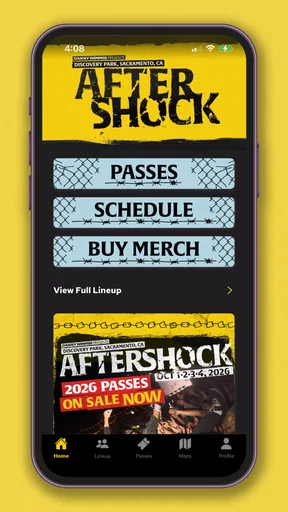
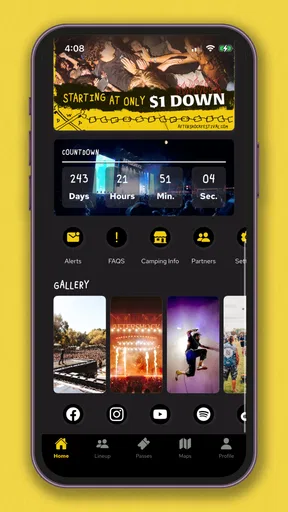
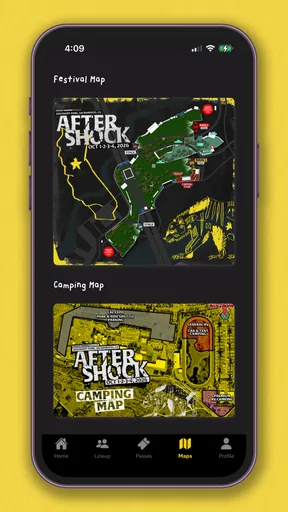
 Analysis by AppCompare
Aftershock Festival is the kind of app I would install before making plans for a large music event, not because it replaces the festival experience, but because it can give that experience a clearer structure. Developed by Danny Wimmer Presents, it is the official event app for Aftershock, a free Events app aimed at Everyone. I found its main value in having festival information gathered in one place instead of forcing me to jump between social posts, browser tabs, screenshots, and messages from friends.
That distinction matters. A festival app is useful only when it helps me answer practical questions quickly: where I need to be, what I want to see, and how I can adjust when plans change. It is less useful if I expect it to solve every problem connected with a crowded outdoor event. My overall impression is that this is a focused companion for people attending Aftershock, with its strongest potential in preparation and on-site orientation. It is not a general music discovery app, and I would not choose it as a substitute for a broader event platform.
How clearly the app supports different ways of attending
I find the app’s clearest role is helping different attendees shape the same festival day around their own priorities, rather than assuming everyone will follow one fixed itinerary. I’d use that flexibility to decide what needs advance planning and what can stay spontaneous, especially when friends have different energy levels or want to see different performances. That distinction also makes it easier to judge where the app is useful—and where personal preparation still matters.
Readability and navigation before the festival
The first thing I appreciate about an official festival app is the reduction of scattered information. When I prepare for a multi-stage event, I do not want to rely entirely on memory or keep refreshing several web pages. Having the event’s own mobile destination gives me a more direct starting point for checking what matters to me and building a personal plan around the day.
For someone who reads carefully and prefers to prepare early, the app can be approached as a planning tool rather than something opened only after arriving. I would use it while deciding which performances are essential, comparing overlapping choices, and making a rough route between parts of the festival. That preparation is especially helpful for first-time attendees, people traveling with friends, and anyone who finds busy event environments easier when the day has some structure.
Readability is not only about font size. It is also about whether information is presented in manageable pieces. A festival schedule can become overwhelming when every stage and time appears at once. I found it more sensible to treat the app as a filter for my own priorities: identify the artists or activities I care about, then use that smaller set to create a realistic day. The most useful habit is to plan around priorities, not attempt to absorb the entire festival at once.
That approach also helps people with different attention needs. Someone who becomes overloaded by dense event information may benefit from making a short personal list before entering the venue. Someone attending with a group can use the same preparation to agree on a few meeting points and non-negotiable performances. The app cannot remove the festival’s complexity, but it can make the first stage of decision-making less chaotic.
Worth Reading Before You Choose

EA SPORTS FC Mobile 26 Is a Bigger Football Game, but It Takes Time

Flipboard Shows What News Apps Must Do Beyond the Feed

Switching to Android Auto Means Rethinking Your Driving Routine

Google Calendar Makes a Crowded Week Easier to Manage

Ludo King Makes the Most of the Minutes Between Plans

Baby Panda World Brings Quick Play to Modern Phones, but Its Game Library Feels Busy
I would still keep important plans in a second form, such as a written note or a screenshot, when possible. This is not a criticism unique to Aftershock; it is a sensible precaution for any event app. Phones can lose battery, networks can become busy, and a screen is not always easy to consult in direct sunlight or among moving crowds. The official app should be part of my preparation, not the only place where I store every detail.
Navigation for people who need more control
Navigation has a different meaning for different attendees. One person may want the fastest route between stages, while another may need more time, fewer changes of direction, or a quieter pause between sets. I would not assume that a standard festival schedule automatically supports all of those needs. The app can help me understand the event’s choices, but I still need to interpret them according to my own energy, mobility, hearing, vision, and tolerance for crowds.
For a visitor with limited stamina, the practical benefit is the ability to plan fewer high-priority stops rather than wandering without a purpose. For a person attending with a child or older relative, a schedule-based plan can make the day more predictable. For someone who dislikes last-minute choices, preparing a primary plan and a backup plan in advance is more comfortable than deciding everything while surrounded by noise.
I also see value for companions. If one member of a group needs to leave early, rest, or avoid a particularly congested area, the app can support a shared conversation about what is realistic. It does not make those decisions for us, but it gives us a common event reference instead of relying on incomplete recollections.
That said, I would not describe the experience as universally effortless. Event apps often place a lot of information behind taps, and the usefulness of any screen depends on how clearly the current information is surfaced. If I am already tired, distracted, or trying to read while walking, even a well-organized schedule can feel demanding. My advice is to explore the app at home, when I have time to learn where the information sits, rather than waiting until I am standing at a stage entrance.
Motor and sensory considerations in a loud, crowded setting
Aftershock is connected to a live festival environment, so the app should be judged in that context. A person may be using it with one hand, while carrying belongings, moving through a crowd, or wearing hearing protection. That changes what “easy to use” means. I would favor short interactions and advance preparation over frequent phone use during performances.
For users with motor limitations, the simplest workflow is to prepare before entering the busiest areas. Save or note the parts of the day that matter, enlarge the phone’s own display if needed, and avoid depending on repeated small taps when the crowd is moving. I would also use voice input or device-level accessibility tools where they are comfortable, but those are features of the phone rather than something I would attribute to the festival app itself.
For users with visual differences, contrast, text size, and screen glare can make a major difference. I would test the app under the same conditions in which I expect to use it: outdoors, with the phone brightness adjusted, and without assuming that every detail will be equally readable. A person who needs larger text or a screen reader should check how the app behaves with the accessibility settings already enabled on the device. I would not claim a certification or guarantee a particular assistive-technology experience without direct confirmation.
Sensory access is even broader than visual readability. A festival can involve intense sound, flashing lights, dense movement, heat, and long periods of standing. The app may help me plan when to attend and when to take a break, but it cannot make those conditions gentle. Someone who is sensitive to noise or crowds should use the app to create an intentionally limited schedule, identify opportunities to step away, and agree with companions on a simple check-in plan.
One practical trade-off is that using the phone can itself become tiring. Constantly checking a screen adds visual distraction and battery use, while a person trying to stay present may not want to consult it between every performance. I prefer a “prepare, check briefly, then put the phone away” routine. That makes the app a support tool rather than another source of sensory input.
Situational access for real festival days
The app is most convincing when I imagine a realistic day rather than a perfect one. Suppose I am attending with two friends and each of us has a different priority. Before leaving, I would compare the schedule, choose the performances we all want to share, and mark separate options for the periods when we split up. We would agree on a meeting arrangement in advance instead of assuming that a phone call will be easy in a loud crowd.
During the day, I would check the app at deliberate moments: before leaving a rest area, before moving toward another stage, and when deciding whether a later performance is still practical. If a friend becomes tired or overwhelmed, the plan can be reduced without turning the whole day into a debate. This is a small but meaningful accessibility improvement because predictability often matters as much as information.
Another scenario is a visitor who is attending alone. The app can help that person make a personal itinerary that does not depend on matching someone else’s preferences. I would recommend keeping the plan flexible, with space for food, water, rest, and unexpected delays. A schedule that looks efficient on a screen may be exhausting in real life, particularly when walking distances, queues, and crowd flow are involved.
For a person who needs extra preparation, I would open the app several times before the event rather than treating it as a last-minute download. Learn the layout, decide which information is essential, and write down the few details that would be hardest to reconstruct without a connection. This workflow reduces the number of interactions required when the environment is noisy or the phone is difficult to handle.
The app also makes sense for people who follow festivals closely and want the official event context in one place. Its status as the official app matters because a first-party source is generally more appropriate for event-specific planning than a generic calendar. Still, I would compare any important practical decision with the latest information available through the event’s own channels, especially if plans are changing close to attendance.
Where the usual alternatives may be better
The natural alternatives are a mobile browser, social media updates, screenshots, notes, and general calendar apps. Each has a different strength. A browser is useful when I want to search broadly or access information without installing another app. Screenshots and notes are excellent for quick offline reference. A calendar is better when I want festival plans to sit beside travel, work, or family commitments.
Aftershock’s official app has a more focused role. It is designed around this particular festival rather than asking me to assemble information from unrelated tools. That can save time and reduce the chance of missing an event detail buried in a social feed. The trade-off is that it has limited value outside the Aftershock context. Once the festival is no longer relevant, a general calendar or notes app remains useful, while this app does not become a broader planning system.
I would also choose a browser first if I strongly prefer not to install event-specific apps or if I need to work across several festivals at once. Someone comparing multiple events may find a general festival website or planning service more convenient. On the other hand, an attendee who wants a dedicated Aftershock reference will probably find the official format more coherent than a collection of saved pages.
There is another important difference: generic tools are under my control, while an official event app reflects the event’s own organization. That is an advantage when the event information is presented clearly, but it also means I should not expect the customization of a full personal planner. I can create my own system around the app, but I would not use it as a replacement for travel planning, accessibility preparation, or communication with companions.
Remaining barriers and honest limitations
The biggest barrier is the setting itself. No interface can fully solve the practical demands of a large live festival. Crowds may slow movement, sound may make conversation difficult, and outdoor conditions may affect how comfortably I can read a phone. People with mobility, sensory, medical, or communication needs may require information and arrangements that go beyond a schedule-centered companion.
I also would not rely on the app alone for urgent needs. A person who needs medication reminders, a detailed personal safety plan, or specific access arrangements should prepare those separately. The app may support the day’s timetable, but personal health and safety planning must remain personal. This is particularly important for anyone whose ability to attend depends on predictable breaks, assistance from a companion, or access to particular facilities.
Battery and connectivity are practical concerns too. Looking at a phone repeatedly can drain power, and a busy venue may not offer the smoothest connection. I would charge fully, reduce unnecessary screen use, and keep essential notes available in a form that does not depend on opening the app every time. That is not a reason to avoid it; it is a reason to use it intelligently.
People who need highly specific accessibility information may also find a general event app insufficient by itself. I would want to verify details relevant to my own situation through the appropriate official event contact or planning materials rather than infer them from a timetable. This is where the app works best as one layer of preparation, not as a complete accessibility guide.
The app’s audience is also naturally narrow. It is free, which removes a financial barrier to trying it, and it is rated for Everyone, but those points do not mean it will suit every attendee. A person who is not going to Aftershock has little reason to keep it. A person who dislikes event apps may prefer a browser and a handwritten plan. A person expecting a full social network, ticket wallet, travel organizer, or universal accessibility assistant should look elsewhere or combine tools.
What the current release suggests about upkeep
The application was released in September 2021 and is currently at version 16.0.1. I read that as a sign that this is an established event companion rather than a brand-new experiment. The developer is Danny Wimmer Presents, and the app has an average rating of 4.2 from over one hundred ratings, with more than thirty written reviews. Those figures suggest a modest but real user base, so I would consider the app worth testing before the event rather than dismissing it as an unproven download.
It has passed ten thousand installs and remains free, which makes the decision straightforward for an attendee: install it, explore it, and remove it later if it no longer serves a purpose. I would not treat the rating as proof that every user will have the same experience. Ratings compress many situations into one number, while accessibility depends heavily on a person’s device settings, reading needs, mobility, and festival routine.
The minimum operating-system requirement is Android 10. That is relevant for anyone using an older phone, particularly if the device is being kept as a backup for the festival. I would check compatibility before relying on it as part of my plan. If a companion has an older device, it is sensible to share essential information in advance rather than assume every member of the group can install the same app.
My inclusive verdict for Aftershock attendees
After using it as an event-planning companion, I see Aftershock Festival as most valuable for attendees who want an official, focused way to organize their day before entering a demanding live environment. It can support different abilities indirectly by helping people reduce uncertainty, prepare shorter itineraries, coordinate with companions, and make deliberate choices about when to move, rest, or split up.
My recommendation is strongest for first-time visitors, people attending with a group, and anyone who feels more comfortable when a complicated day is broken into manageable decisions. I would especially encourage users with sensory or stamina concerns to prepare early and use the app selectively, rather than trying to navigate the entire festival through a phone in real time.
I would be more cautious if I needed detailed, situation-specific accessibility guidance, if I depended on a screen-reader experience that had to be guaranteed, or if I wanted one tool for several events. In those cases, the app should be paired with direct planning, device accessibility settings, written notes, and whatever official support is relevant to the individual situation.
In the end, I think the app earns its place as a practical starting point, not a complete solution. Its free access and event-specific focus make it easy to try, while its usefulness depends on how thoughtfully I prepare around it. If I treat it as a clear reference for my priorities—and keep backup plans for battery, connectivity, crowds, and personal needs—it can make Aftershock feel more manageable without pretending that an app can remove every barrier of a major music festival.
Pros
- Excellent lineup for fans of rock
- metal
- and alternative music.
- Festival schedules and artist information are easy to check.
- Multiple stages provide plenty of performances throughout the event.
- Strong community atmosphere for discovering new bands and artists.
- Useful event details help with planning travel and daily activities.
Cons
- Large crowds can make popular performances difficult to access.
- Food
- drinks
- and merchandise may be expensive on-site.
- Long walking distances can be tiring during a full festival day.
- Weather conditions may affect comfort and outdoor performances.
- Some features depend on reliable mobile internet at the venue.
FAQs for Aftershock Festival
What is Aftershock Festival, and what can I expect from the app?
Aftershock Festival is a music event focused primarily on rock, metal, punk, and alternative acts. Its companion app is designed to help attendees explore the lineup, view performance times, check the festival map, and keep track of important updates. Before downloading, remember that the app is mainly a practical event guide rather than a music-streaming or ticket-resale platform. Features may change depending on the festival edition.
Can I use the Aftershock Festival app to buy tickets?
The app may provide access to official ticket information, purchasing links, ticket management, or entry details, but availability can vary by year and event status. I recommend checking that any purchase link leads to the official Aftershock Festival or authorized ticketing service before entering payment details. Downloading the app does not automatically include admission, and a separate valid ticket is generally required to enter the festival grounds.
Does the Aftershock Festival app work without an internet connection?
Some information, such as previously loaded schedules, saved artists, or basic festival details, may remain accessible when your connection is limited. However, live announcements, schedule changes, maps, ticket updates, alerts, and other online features normally require mobile data or Wi-Fi. To avoid problems at the venue, open the app before arriving, save important information when possible, and keep your phone charged throughout the day.
What features are most useful for planning my festival day?
The most useful tools are usually the artist lineup, set-time schedule, customizable favorites, festival map, stage information, and push notifications. Saving the performers you want to see can make it easier to build a personal itinerary and reduce the chance of missing a set. You should still allow extra time for walking, queues, food, restrooms, and possible schedule changes caused by production or weather conditions.
Is the Aftershock Festival app safe and available for both Android and iPhone?
The official Aftershock Festival application may be offered through Google Play and the Apple App Store, depending on the current festival season and the organizer’s release plans. For safety, verify the publisher name, app branding, reviews, and download source before installing it. Avoid unofficial copies that request unusual permissions or payment information. App performance and supported operating-system versions can differ between Android and iOS devices.


